


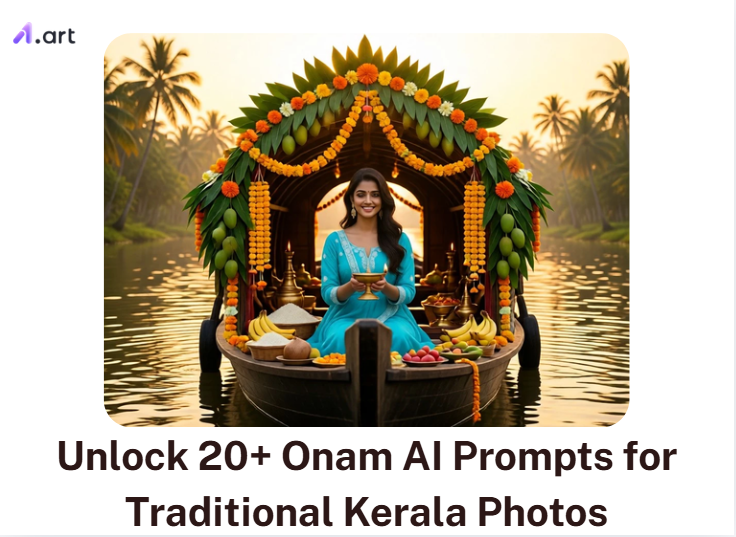
Missing the warm glow of a brass lamp and fresh marigolds this Onam? Living far from home makes snapping that perfect festival photo tough. But you are not alone in turning to tech for help. The global AI image generator market has reached USD 1,081.2 million this year.
A simple Onam AI prompt fixes this. It helps you design stunning Malayalam Onam greetings, beautiful Onam wishes photos, and a custom Onam invitation. Skip the costly studio. You can generate Happy Onam pics packed with crisp Kasavu sarees.
Let's learn how to write better Onam photo prompts to create your digital memories today.
Key Takeaways
-
A winning Kerala AI prompt needs 6 key elements: subject, cultural detail, setting, lighting, composition, and size.
-
Ask for a "cream Kasavu saree" or a "fresh Pookalam" in a sunlit Kerala courtyard.
-
AI frequently hallucinates letters. The truth is, image generators still struggle with spelling.
-
Type your Malayalam Onam greetings manually in an editing app.
-
Try a wide 16:9 ratio for snake boat races, and a classic 1:1 square for your Onam card design.
-
AI easily distorts fingers. Frame portraits from the waist up to dodge awkward glitches.
-
Never upload photos without permission. Always inspect your results before posting!
Start your art journey with a1.art.
What Are Onam AI Prompts?
Think of an Onam AI prompt as a recipe for a digital painting. It tells the tool what to draw for the Happy Onam festival. If you type Onam images, the AI gets confused. It might mix up traditions or draw the wrong clothes.
This is where advanced AI image generators like a1.art step in. When fed the right instructions, this platform excels at capturing the vibrant essence and intricate cultural details of Kerala's biggest festival.
Instead, a detailed Onam prompt for ChatGPT acts as a clear visual brief. In fact, recent digital art studies show that structuring your text reduces weird AI mistakes and distorted faces.
To get the best result, use this easy prompt layout:
Subject + Kerala detail + Setting + Lighting + Composition + Format.
For example, picture a woman in a cream Kasavu saree with a fresh jasmine braid. She stands near a bright Pookalam in a courtyard. Tell the AI you want "soft morning daylight" and a "vertical 4:5 portrait."
By guiding the AI, it stops guessing. You get a beautiful, realistic image generated by a1.art, complete with stunning festive details and a clean space to type your custom message later.
How to Use It, Just 3 Steps:
Using a1.art is incredibly simple. Here’s the full beginner-friendly guide:
Step1:
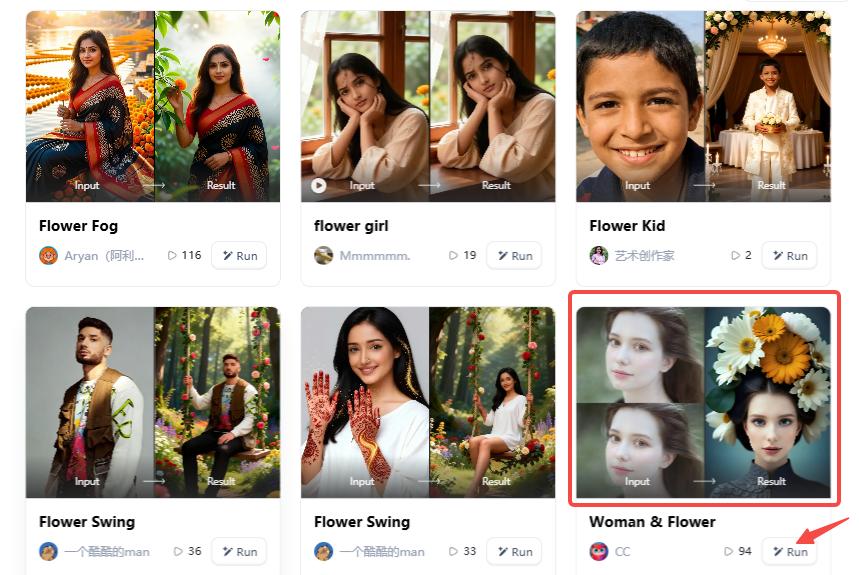
Open a1.art, choose the App that you are interested in, then click 「Run」
Click on the image to experience the same App👇
Step2:
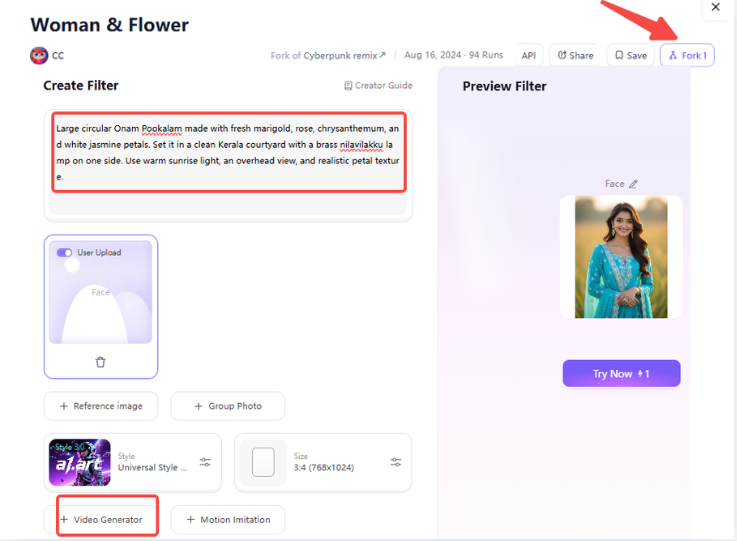
Upload a photo/image
Step3:
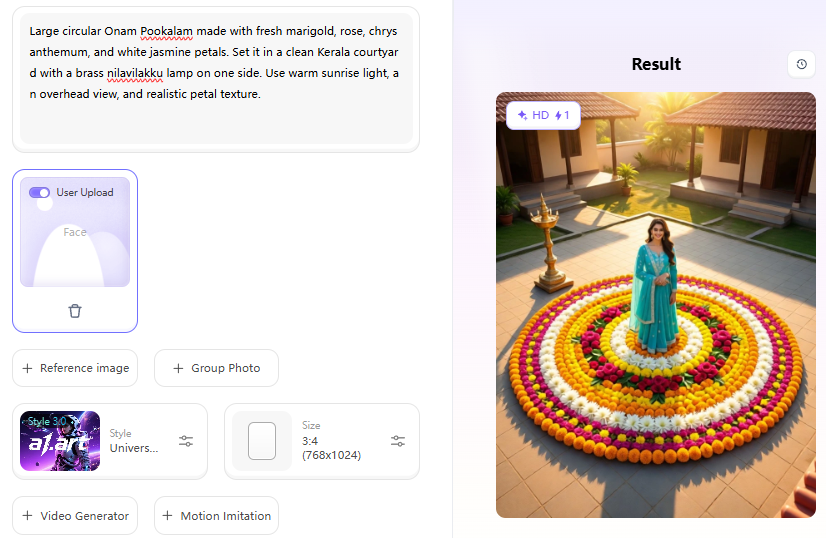
Wait 3 seconds, you will get a wonderful result 👇
20+ Onam AI Prompts for Kerala Photos
Creating the perfect digital art starts with the right words. Whether you need a festive profile picture or a banner for your local business, specific text instructions make all the difference.
To help you get started, we have grouped 20+ tested prompts into common festival themes:
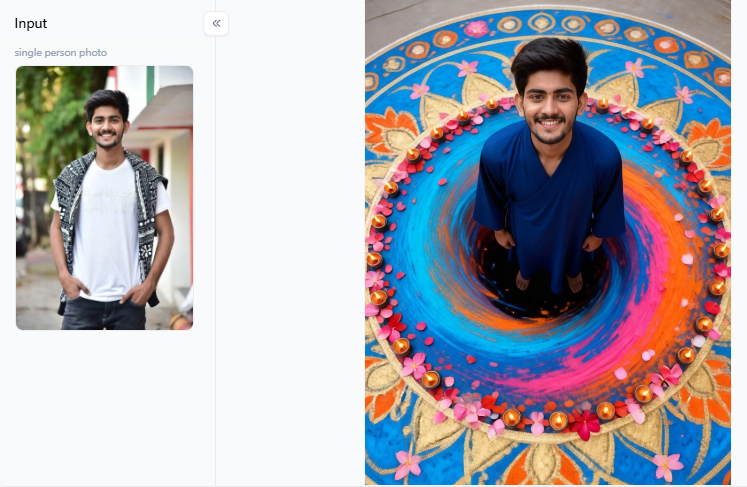
Pookalam Flower Rangoli Prompts
Floral designs are the heart of the festival. Local businesses in Kerala often update their WhatsApp statuses with flower art, which drives higher customer engagement during the holidays. These prompts are perfect for creating beautiful Onam wish images.
-
Traditional Pookalam: Large circular Onam Pookalam made with fresh marigold, rose, chrysanthemum, and white jasmine petals. Set it in a clean Kerala courtyard with a brass nilavilakku lamp on one side. Use warm sunrise light, an overhead view, and realistic petal texture. Leave empty cream space above for a greeting, vertical 4:5 size.
-
Minimal Card: Minimal Onam card design with an ivory background. Place an elegant small Pookalam at the bottom and one brass lamp. Use a soft Kerala green and gold color palette. Keep a clean center space for Malayalam Onam greetings: modern premium design, no generated text.
-
Rainy Courtyard: Fresh Pookalam in a rain-washed Kerala home courtyard. Show a red clay floor, water droplets on flower petals, and wet banana leaves. Use gentle, cloudy daylight, realistic photography, and a wide 16:9 aspect ratio.
Onasadya Banana-Leaf Feast Prompts
Food bloggers and restaurants see massive traffic spikes around Thiruvonam. People love sharing pictures of a massive 26-dish Sadya. Use these prompts to create mouth-watering visuals or a restaurant Onam invitation.
-
Widespread: Traditional Kerala Onam Sadya served on clean banana leaves. Show rice, avial, sambar, thoran, and banana chips placed neatly in separate portions. Use overhead food photography, warm window light, and realistic food texture, horizontal 16:9 size.
-
Family Feast: Multi-generation Kerala family enjoying Onasadya at home. Adults wear Kasavu sarees and a white mundu. Place the banana-leaf meal in the foreground. Use soft natural daylight, candid smiles, and realistic family photography.
-
Menu Background: Premium Onam Sadya restaurant poster background. Show detailed banana-leaf texture and a small brass lamp. Use a warm cream-and-green color palette with an elegant Pookalam border. Leave a clean central space for a restaurant menu; no text.
Click the picture to generate your exclusive rangoli gate with one click👇
King Mahabali and Festive Greetings
King Mahabali represents the spirit of the season. Schools and community centers need Mahabali posters for their events.
-
Welcome Scene: King Mahabali arriving in a Kerala village. Show smiling families welcoming him with a colorful Pookalam in the foreground. Include coconut palms, soft golden daylight, and a blank banner area for a greeting.
-
Modern Poster: Modern minimal Onam poster featuring a friendly King Mahabali silhouette. Use a geometric Pookalam design with a cream, green, saffron, and gold color palette. Keep clean shapes and a large empty center for event info.
-
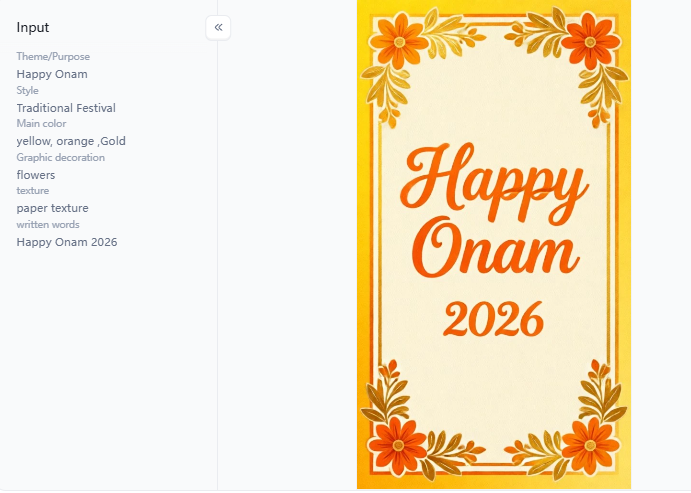
Greeting Frame: Elegant Malayalam Onam greetings frame. Use cream paper texture, a thin gold border inspired by Kasavu fabric, and floral corners. Leave a clean empty middle area to manually add text, square 1:1 size.
Vallam Kali and Kerala Backwaters
Tourism boards report that snake boat races are the most popular Kerala visuals shared globally. These prompts bring that high energy to your social media pages.
-
Boat Race Wide: Vallam Kali snake boat race on Kerala backwaters. Show a long narrow boat filled with coordinated rowers. Add water splashing around paddles, bright monsoon daylight, and a cinematic wide 16:9 size.
-
Dynamic Reel Cover: High-energy Kerala snake boat race from a low camera angle near the water. Show rowers moving in rhythm with water splashing toward the lens. Use a dramatic cloudy sky, vertical 9:16 size, and leave the top clear for a title.
-
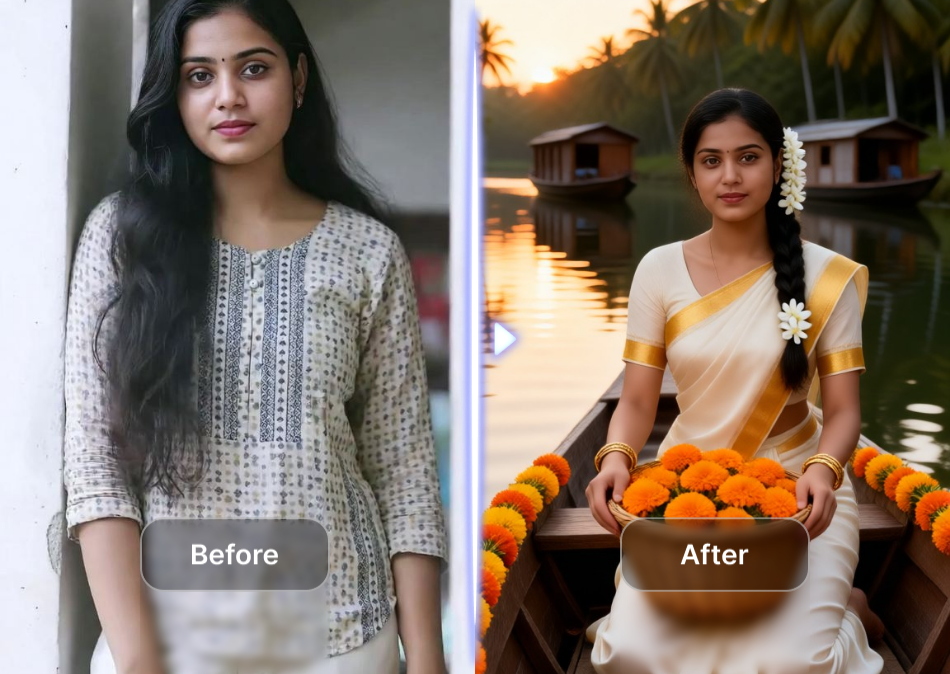
Quiet Backwater: Quiet Kerala backwater at golden hour. Show a traditional houseboat, smooth water reflection, and a small Pookalam in the lower corner. Keep a clean sky space for greeting text.
Kasavu Saree and Traditional Outfits
Handloom Kasavu sales skyrocket in August. People want to show off this authentic style online. This is the perfect time to use an Onam AI photo prompt for a new profile picture.
-
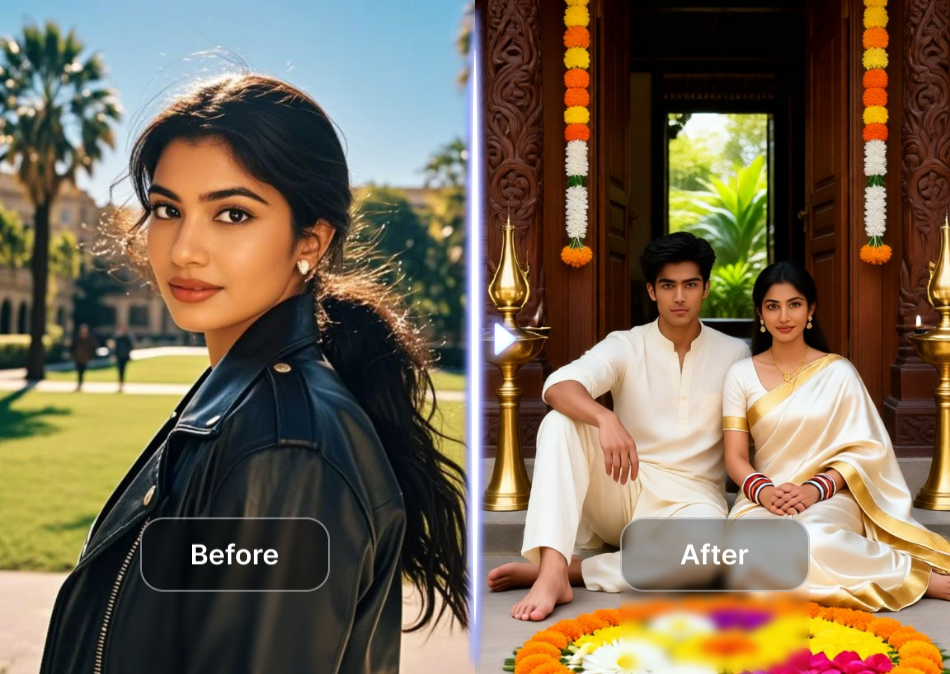
Saree Portrait: Adult Kerala woman in a cream Kasavu saree with a narrow gold border. Add jasmine flowers to a low braid and simple gold jewelry. She stands near a Pookalam in a courtyard. Use soft daylight, natural skin texture, and a vertical 4:5 aspect ratio.
-
Mundu Portrait: An adult Kerala man wearing a white mundu and a cream shirt. He stands on a traditional Kerala home verandah. Include a brass lamp in the background, warm morning light, and a relaxed pose.
-
Family Celebration: A Kerala family of four wearing coordinated cream-and-gold festive outfits. They sit beside a fresh Pookalam. Show natural expressions, warm golden-hour light, and an upper-left blank space for Onam wishes.
-
Wedding Concept: Adult woman in an elegant Kerala wedding saree. Show cream silk with a refined gold border and traditional temple jewelry. Use a softly lit Kerala heritage-house background, vertical 4:5 size.
Click the picture to generate your exclusive ai happy onam with one click👇
Cultural Dance and Artistic Styles
Celebrate Kerala's deep artistic roots with these detailed cultural prompts.
-
Thiruvathira Dance: Women perform Thiruvathirakali in a graceful circle around a brass lamp. They wear cream-and-gold Kasavu sarees. Use warm evening lamps and a wide cultural photography style.
-
Kathakali Portrait: Respectful close portrait of a Kathakali performer in traditional makeup and costume. Use dramatic side lighting, a dark simple background, and highly detailed face paint.
-
Mural Artwork: Traditional Kerala Mural Painting Style showing an Onam Pookalam, a brass lamp, and lotus motifs. Use a rich red, ochre, green, and gold palette.
Modern Onam Wishes and Invitations
Corporate offices and modern brands need clean, professional greetings. These prompts deliver simple, stylish Onam pictures for the workplace.
-
Modern Wishes: Modern social post with a clean cream background. Add a subtle Pookalam pattern, a gold lamp, and a green banana leaf accent: a premium minimal layout with no text.
-
Office Invitation: Elegant invitation design on a warm ivory background. Include a gold Kasavu-inspired border and small Pookalam details. Leave a clean center for the date, time, and venue.
-
Office Party: Modern Kerala office celebration. Adult colleagues wear festive cream-and-gold clothing. Show a Pookalam at the entrance, bright indoor daylight, and a professional group pose, horizontal 16:9 size.
Click the picture to generate your exclusive ai invitation card desigm with one click👇
Why Create Onam AI Images With a1.art?
Building an Onam AI prompt from zero takes time. Instead of typing instructions, a1.art uses a smart filter system. Think of it as a visual head start. You pick a mood, and the AI does heavy lifting.
This matters because recent digital safety guidelines from NIST warn about AI creating biased or fake-looking images. A guided tool helps you avoid those messy results while putting you in control.
Here is how to use these tools for your festival pics:
-
Quick Greetings: Need a fast Onam card design? Click the Happy Onam or Vishu Blessing filters. They apply warm gold and greens. Just leave the center blank to type your Malayalam Onam greetings later.
-
Travel Reels: For a calming video, use Kerala Backwater Love or Kerala Houseboat Solo Rain. Tell the AI to add a "gentle water ripple" or a "soft rain falling." Keep the motion simple, so the faces don't blur.
-
Easy Edits: The "Fork" button is a lifesaver. It lets you copy a design you like, change one detail, such as swapping a flower rangoli for a banana-leaf feast, and generate a new version.
Even with great filters, AI still makes mistakes. For example, Kerala Reddit users often laugh at AI giving King Mahabali a broken, melted palm-leaf umbrella. You must act as the director and fix these errors before posting.
| The AI Problem | Your Simple Prompt Fix |
| Plastic, shiny skin | Add "natural skin texture, soft daylight, realistic pores" |
| Weird, twisted fingers | Type "hands outside frame" or "medium portrait" |
| Fake alien text | Ask for "no text" and type it yourself later |
Always double-check the sarees, food, and backgrounds before sharing your Onam wishes photos. Most importantly, read the platform privacy guidelines. By combining these smart filters with careful human editing, your festival art will look stunning, authentic, and natural.
Click the picture to generate your exclusive happy onam with one click👇
The Bottom Line: Your Digital Festival
With over 35 million Malayalis celebrating globally, a great Onam AI prompt does more than draw a pretty picture. It bridges the distance back home. By mixing realistic lighting with exact cultural details, you can craft Onam wish images that feel authentic.
Forget generic stock photos. Whether you are typing a custom Malayalam Onam greeting on a digital card or dropping vibrant pictures into your family WhatsApp group, these tips turn your ideas into lasting festival memories.
FAQs
Q: How do I write the perfect Kerala saree prompt?
To get that authentic look, you must be specific. Studies show vague prompts cause heavy distortion. Tell the AI what you want. Try typing: "Woman in a handwoven white Kasavu saree with a thick golden zari border in a Kochi courtyard." Using a1.art, this formula renders crisp, realistic cotton fabric instantly.
Q: Can I generate a Kerala wedding saree AI photo?
Yes, you can! Real Kerala brides often wear heavy gold temple jewelry and a crisp cream silk drape. To recreate this, describe the rich silk texture and fresh jasmine braids. If you use portrait tools on a1.art, add "soft indoor venue lighting" to give the bride a glowing, authentic appearance.
Q: Can I use these prompts with my existing photo?
Definitely, almost 60% of users prefer editing their own selfies over generating fake faces. You can upload your favorite portrait into a1.art. Then, use an Onam AI prompt to swap your background to a festival scene. You keep your identity while the tool wraps you in the holiday spirit.
Q: Can I change the outfit to an Onam AI prompt?
Yes, outfit swaps are incredibly easy. Instead of just typing "change clothes," be highly descriptive. Tell the AI to "replace the shirt with a traditional cream mundu and gold-bordered shawl." By using the precise image-to-image filters on a1.art, it naturally stitches the new fabric over your old clothes without looking fake.
Q: What details make a Kasavu saree AI photo realistic?
Realism always hides in tiny details. A genuine Kasavu is handwoven cotton, not shiny plastic. Ask the AI for "natural fabric folds, cream-white threading, and a metallic gold border." When you generate this in a1.art, these keywords help the computer catch the soft morning light hitting the cloth, making it look real.
Read more
- Best Prompt Hero AI Alternatives for AI Prompts and Image Generation
- How to Create Childhood vs Present AI Photo?
- Dreemy AI Review 2026: Is It Safe, Free and Worth It?
- Best MyAIArt Alternatives in 2026
- MyAIArt Review: Features, Pricing & Alternatives for Better AI Photos
- How to Create 3D Pixar Couple AI Images Step by Step?
- How to Create a Hot AI Video from an Image
- Best Indian Nude Websites in 2026: Top Sites to Explore
- How to Create an AI French Kiss Video for Free
- Spider Man AI Trend: How to Create Viral Spider Man Photos in 2026
Written by

a1.art
Published on
Aug 31, 2026
Share article


